

Table of Contents
NHV BOOT
NHV BOOT Computer Rescue Toolkit with modern, professional design, fast speed, support from old computers to latest computers. NHV BOOT brings many advanced features to everyone to be able to solve computer problems and errors. NHV BOOT with a modern and intuitive interface aimed at all users.
NHV BOOT with a fast, powerful, beautiful modern design and many useful features for everyone to be able to troubleshoot computer problems, especially suitable for technicians. NHV BOOT is oriented towards user experience, every detail is meticulously cared for by the author with an intuitive interface aimed at all users. See more AutoCAD 2027
Features of NHV BOOT
- Support booting according to 2 boot standards UEFI and Legacy
- Support computer generations from old to latest
- Boot speed on all WinPE versions is very fast
- WinPE interface design is intuitive, synchronous, modern
- Support to install Windows 11 bypass with Setup.exe in ISO file
- Identify NVME laptop hard drive Intel Gen 11+ 12+ AMD Series
- Automatically add NVME Intel Gen 11+ 12+ drivers when installing Windows
- Modern Wifi connection interface. Internet connection speed is very fast
- Support to receive touchpad on most new or old laptops
- Advanced rescue features, full software and tools
- Supports most WiFi + LAN drivers. Networking in WinPE
- Change background image on all versions of WinPE
- Support reading and writing APFS macOS partition, Ext4 Linux
- Support file transfer, share data in VMware Workstation
- Unlock Bitlocker WinPE required ( Password , RecoveryKey )
- Support to receive Intel Gen 11+ 12+ & AMD Laptop audio
- Unlock password, fingerprint, Microsoft account & Domain
- Compatible with most Apple computers (MacBook, iMac…)
- Boot UEFI 32bit with Win10PE 32bit for some supported machines
- Support regular updates. Update new features
NHV BOOT Free Download
NHV BOOT 2026 V2100 WinPE EXTREME
NHV BOOT 2025 V1900 WinPE EXTREME
NHV BOOT 2023 v1500 WinPE EXTREME
NHV BOOT 2023 v1300 EXTREME
How to create usb NHV BOOT
You can use the Rufus version in the downloaded file, yes guys => then run and set up as shown below.
- Device: You select the exact USB or HDD/SSD that you want to create BOOT.
- Boot selection: Select to the BOOT file (*.ISO format) that you downloaded in the
- preparation section.
- Partition scheme: You choose MBR.
- Target system: You choose BIOS or UEFI.
- File system: You leave it as FAT32 (Default)
- => Then click START button to start creating BOOT.
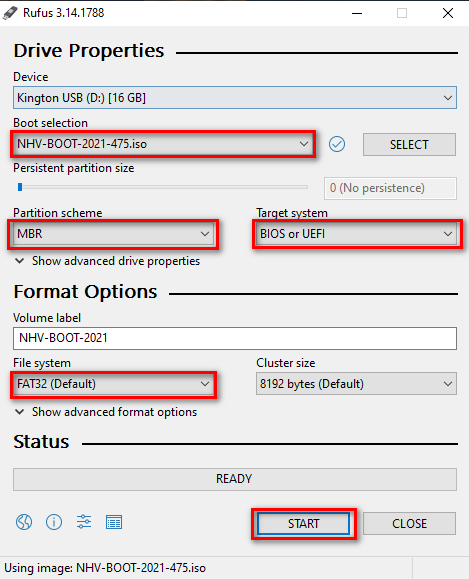
Note: Since the Boot partition must be formatted as FAT32 for UEFI compatibility, it cannot store files larger than 4GB. Therefore, after creating the Boot partition, we need to use Partition Wizard to split and create an additional USB-DATA (NTFS) partition for storing large files
Next step: Open MiniTool Partition Wizard, right-click on the newly created USB partition, and select Move/Resize to start resizing


Thus, the process of creating the NHV BOOT USB is complete At this point, your USB possesses a standard structure with 2 separate partitions: NHV BOOT (FAT32) for compatibility with both UEFI/Legacy standards and USB-DATA (NTFS) for storing large files.





