Table of Contents
Adobe Photoshop 2025
Adobe has released Adobe Photoshop 2025 (version 26.0) with a series of new features and improvements. In particular, tools such as Remove tool, Generative Fill, Generative Expand, Generate Similar all have improvements to help users edit photos faster and more richly. Below are the new features and improvements in Adobe Photoshop 2025.
Distraction Removal in the Remove tool will automatically detect and remove unwanted wires, cables, and people in the photo at once.
Additionally, when editing with the Remove tool, users can choose how much Generative AI they need for their photos and scenes with the Auto, Generative AI On, or Generative AI Off options from the options bar.

Features of Adobe Photoshop 2025
- Create Richer, More Realistic Images with the Latest Adobe Firefly Image Model
Generative Fill, Generative Expand, and Generate Similar are now supported by the latest Adobe Firefly Image Model. With the new model, these tools will have significantly improved image quality, better command understanding to handle complex descriptions, and create diverse variations. - According to Adobe, the results will be of higher quality, giving creators more confidence, more control, and more detail.
- Generate Similar
- When editing photos with the Generative Fill, Generative Expand, Generate Background and Generate Image tools, users can use Generate Similar to create other variations of an existing photo. This way, users can freely choose the photos they find most suitable during the editing process.
- Create a new background with the Generate Background feature
- Users can use the Generate Background feature to replace the background of an image, while cleverly adjusting the light, shadow, and perspective to match the main subject in the photo. In addition, the Generate Background feature is also integrated directly into the Contextual Task Bar, making it easy for users to use and save time.
- Control, Convert, and Preserve Color Workflows with OpenColorIO and 32-bit Tools
Adobe announced that Photoshop 2025 (version 26.0) supports OpenColorIO (OCIO). This allows users to control, convert, and maintain color workflows with superior quality when combined with different software. - In addition, Adobe also expanded the ability to process 32-bit HDR images. With Photoshop 2025, users can take advantage of many editing tools directly on 32-bit HDR images, eliminating the need to convert to 16-bit or 8-bit format, thereby preserving image quality and color accuracy optimally.
- Other changes and improvements in Adobe Photoshop 2025
The font browser in Photoshop 2025 has been significantly improved, making it easier and more flexible for users to choose fonts. Specifically, users can use these fonts for a variety of purposes, from digital graphic design to product packaging creation.

System requirements
Minimum requirements
- CPU: Multi-core processor with 64-bit support
- Operating system: Win 10 (V22H2); Win 11 (V21H2, V22H2, V23H2)
- RAM: 8 GB
- Hard drive: 4 GB available hard drive space
- Graphics card: 1.5GB Vram and Supports OpenGL 2.0
Ask for recommendations
- CPU: Multi-core, multi-threaded processor with 64-bit support
- Operating system: Win 10 (V22H2); Win 11 (V21H2, V22H2, V23H2)
- RAM: 16 GB or more
- Hard drive: SSD hard drive
- Graphics card: Dedicated graphics card with 2 GB VRAM or more
Adobe Photoshop 2025 Free Download
Adobe Photoshop 2025 v26.10.0.7
Adobe Photoshop 2025 Portable
Adobe Full
How to install Adobe Photoshop 2025
- Turn off anti-virus software (Note also turn off Windows Defender)
- Download the software and extract Pass: ycongnghe.com it with Winrar
- Run the Setup file and select the English language
- Uncheck the Advertising
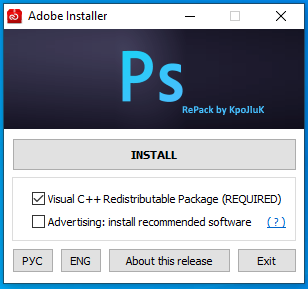
- If you have Microsoft Visual C ++ Full installed, you can leave both marks unchecked
- Click Install is finished, watch the detailed installation video